
Comparison
Software for Rosters, Shift Notes, Timesheets and Invoices: What NDIS Providers Actually Need
Looking for one system to handle rosters, shift notes, timesheets and invoices for your NDIS business? Here's what to check for and how Sparks Provider fits.

Kim MatthewsFounder and disability support provider
If you are running a small NDIS provider and juggling a roster spreadsheet, a shared notes document, a separate timesheet process and manual invoicing, you are not alone. Most providers start this way. The question is whether one piece of software can genuinely replace all four without turning into something built for a much bigger business than yours.
What this kind of software actually needs to do
Before comparing tools, it helps to be clear on the job. For a small provider employing their own support workers, the real workflow looks like this: plan the week's shifts, let staff see and work their shifts, capture what happened during the shift, approve the hours, then turn approved hours into an invoice. Anything extra is a bonus. Anything missing means you are back to juggling systems.
- Rostering that handles one-off and repeating shifts, including 2:1 supports, group sessions, sleepovers and public holidays
- Staff access to their own shifts and the client details they need, without seeing everything in the business
- A place for shift notes and incident reports attached to the actual shift
- A clear approval step before hours go anywhere near payroll or invoicing
- Invoicing priced from current NDIS support items, not manual calculation
- A way to get approved hours into payroll without re-typing them
How Sparks Provider handles each part
Sparks Provider was built around that exact workflow, deliberately without the enterprise feature list that larger platforms carry. The roster covers one-off and repeating shifts, unassigned shifts, 2:1 and 3:1 supports, group sessions, sleepovers, active overnights, public holidays and chargeable cancellations. Staff are invited to their own account where they see only their own shifts and the client details relevant to those shifts. They can record availability, add shift notes or incident reports, and submit their hours from there.
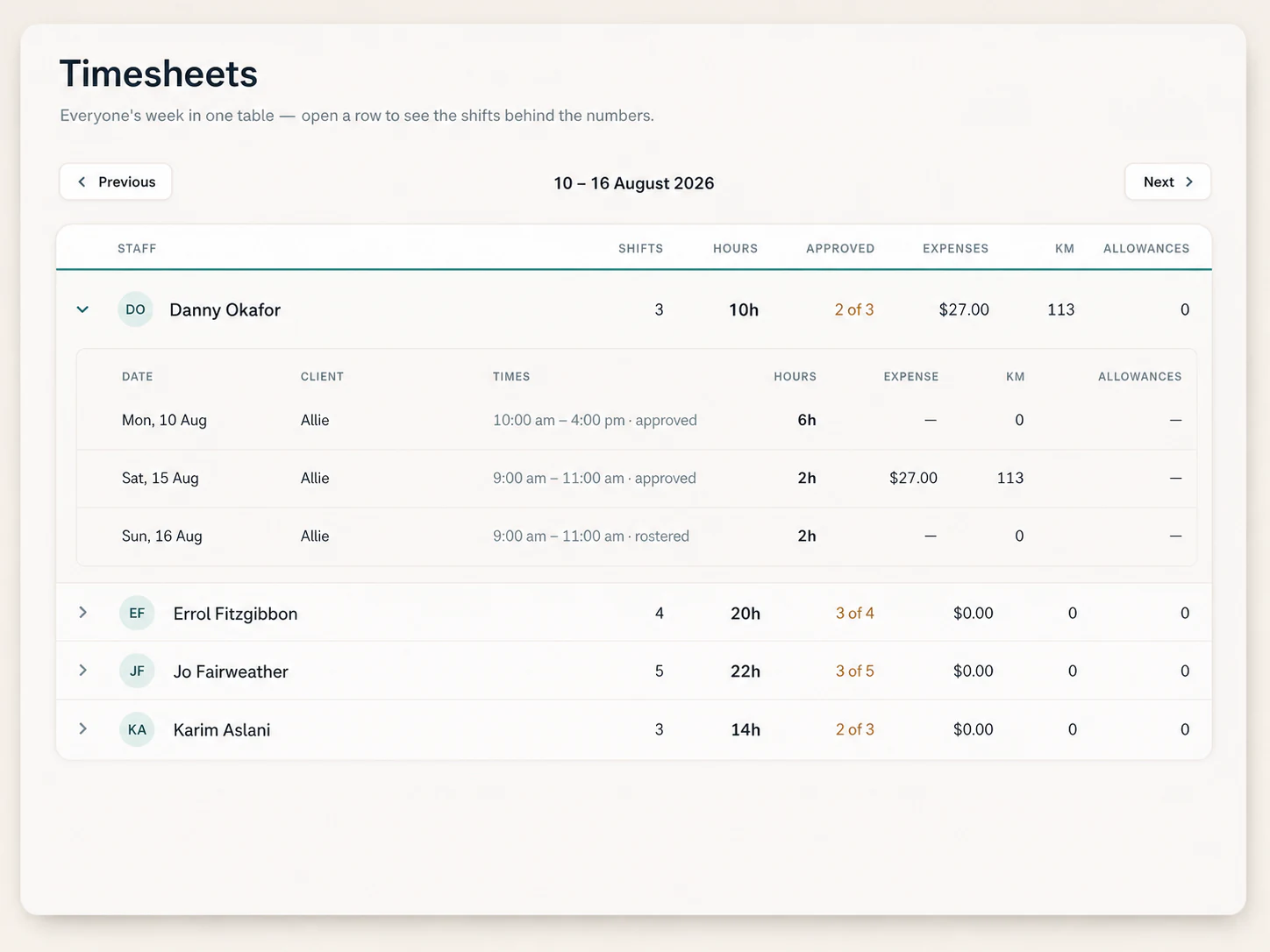
Owners and admins review the week and approve hours before anything moves forward. Approved work becomes invoices priced from that business's own price book, built on current NDIS support items. For NDIA-managed work, Sparks Provider creates a claim file ready to upload to PRODA, though it does not sign in or submit on your behalf. Xero integration is included at no extra cost. Unsent invoices can be pushed to Xero as drafts, and approved timesheets can be sent to Xero payroll as draft timesheets for checking before anyone gets paid.
What it will not do for you
It is worth being upfront about the edges. Sparks Provider does not calculate wages, interpret awards or decide pay rates. It records and approves the hours, then hands the draft timesheets to Xero where payroll happens. It does not hold or manage participant funds and it is not plan management. There is no recruitment or worker-matching feature. And while service agreements can be sent for electronic signing and kept with the participant record, the app organises your operational records; it does not make your business compliant. That responsibility stays with you.
Comparing against what you use now
If you are coming from a spreadsheet and a folder of shift notes, almost any dedicated system will feel like a step up. If you are already using another provider platform and wondering whether it is worth the switch, the honest answer depends on whether you are paying for features your business does not use. We publish a direct, fact-based comparison at sparksprovider.app/compare/shiftcare, written from our own perspective as the people who built Sparks Provider, so read it with that in mind rather than as independent review.
Sparks Provider is $499 a year including GST, covering unlimited staff and unlimited clients, because the price is set per business rather than per person. There is a built-in ShiftCare import that brings across participants, staff invitations and up to seven years of shift history and progress notes, and re-importing the same file will not duplicate anyone. There is also a supported move for sole traders using Sparks Scribe who have grown into a team.
Try it before deciding
The 7-day free trial needs no card, so you can roster a real week, have a staff member log a shift note, approve an hour and raise an invoice before deciding anything. If you want to see the workflow before signing up, the [Sparks Provider how-to videos](https://www.youtube.com/playlist?list=PLZlqhhCs9bQI) walk through rostering, approvals and invoicing step by step. You can also use sparksprovider.app/calculator to see what the all-in-one yearly price looks like against what you are currently paying across separate tools.
Common questions
The details people ask next.
Can support workers see all participants in the system?
No. Staff see only their own shifts and the client details relevant to those shifts, not the full participant list.
Does Sparks Provider submit claims to the NDIA?
It creates a claim file for NDIA-managed work that you upload to PRODA yourself. It does not sign in or submit claims on your behalf.
Will invoices and timesheets go straight to payroll?
Approved timesheets can be sent to Xero payroll as drafts for checking. Sparks Provider does not calculate wages or interpret awards.
Can I move our shift history from ShiftCare?
Yes, a built-in import brings across participants, staff invitations and up to seven years of shift history and progress notes. Re-importing the same file will not create duplicates.
Is there a mobile app for staff to use on shift?
Yes, official apps are live on Google Play and the App Store, and existing users sign in with the same account they already use, no second subscription required.
This article is general information only and is not financial, NDIS or compliance advice. NDIS pricing and claiming requirements can change, so check the current NDIA pricing arrangements and provider guidance before relying on it.